
Embedded firmware that survives the field
Architecture, interrupts, memory, watchdogs used properly, and diagnosing faults you cannot reproduce, on devices that must run for years with nobody present.
In short
- Most firmware defects live in logic, not registers, and logic can be tested without hardware if the boundary is drawn properly.
- An operating system is a choice, not a default. A well-structured loop suits a great many devices.
- Allocate at startup. A device running for years cannot tolerate fragmentation or a late allocation failure.
- A watchdog reset from a timer interrupt guarantees nothing. It should reflect the system actually working.
- Design for diagnosing faults you cannot reproduce, because the field will produce them.
What makes this different from other software
Embedded firmware operates under constraints that most software does not. Memory is fixed and small. There is frequently no operating system to catch mistakes. The program must run for years without being restarted. When it fails, there may be nobody present, no screen, and no way to attach a debugger. And it interacts with physical hardware that behaves in ways the datasheet does not entirely describe.
These constraints change what good practice looks like. Techniques that are unremarkable in application software, such as allocating memory as needed or failing fast on an unexpected condition, become hazardous. Others that would seem excessive elsewhere, such as recording why the device last restarted, become essential.
The architectural choice: loop or scheduler
The first structural decision is whether to run a single main loop with interrupt handlers, or to use a real-time operating system with multiple tasks.
| Aspect | Loop with interrupts | Real-time operating system |
|---|---|---|
| Complexity | Low; the whole flow is visible | Higher; behaviour depends on scheduling |
| Memory overhead | Minimal | Kernel plus a stack per task |
| Timing | Predictable, but the loop must stay short | Priorities give responsiveness, at the cost of harder reasoning |
| Concurrency hazards | Only between the loop and interrupts | Between every task, plus interrupts |
| Debugging | Straightforward | Timing-dependent faults are harder to reproduce |
| Suits | Sensors, simple controllers, battery devices | Several independent activities, network stacks, complex products |
The honest position is that a great many devices do not need a scheduler, and that adopting one by default imports a class of concurrency problem for no benefit. A loop that reads inputs, runs a state machine and services outputs, with interrupts handling anything urgent, is easy to understand, easy to test and easy to reason about at three in the morning.
An operating system earns its place when there genuinely are independent activities with different timing requirements, when a library or stack you need assumes one, or when the application is complex enough that a single loop becomes a tangle of state. Those are real situations. They are just less common than the default suggests.
Structuring the logic either way
Whichever is chosen, explicit state machines are usually better than flags and nested conditionals. A state machine makes the possible states enumerable, makes the transitions reviewable, and makes it obvious when an input arrives in a state that has no handling for it. A collection of boolean flags describing the same behaviour is equivalent in principle and considerably harder to verify.
The other habit worth adopting early is separating decisions from actions. Code that decides what should happen, and code that makes it happen, are easier to test and easier to change when they are not the same function.
Interrupts, and the mistakes they invite
Interrupt handlers are the one place where genuine concurrency exists even in the simplest firmware, and most of the difficult bugs in embedded systems originate here.
- Keep handlers short. An interrupt handler should capture what happened and return. Processing belongs in the main flow, where it can be interrupted in turn and where it does not block other interrupts.
- Shared data needs protection. A variable written by an interrupt and read by the main loop can be read halfway through an update if it is larger than the processor handles atomically. The usual result is a value that was never actually written, appearing rarely enough to be dismissed as a glitch.
- Marking a variable volatile is not synchronisation. It tells the compiler not to optimise away accesses. It does nothing about a read that occurs partway through a write.
- Critical sections must be brief. Disabling interrupts to protect a shared structure works and delays everything else, including the interrupts whose timing you were relying on.
- Do not block inside a handler. Waiting for anything inside an interrupt holds the system hostage to something that may not complete.
These faults share a characteristic that makes them expensive: they are timing-dependent, so they appear rarely, often only under load, and frequently disappear when a debugger is attached. A fault that cannot be reproduced on a bench is a fault that has to be reasoned about, which is why structuring the code to make these mistakes difficult is worth more than skill at finding them afterwards.
Time, which is harder than it looks
Firmware deals with time constantly and gets it wrong in a small number of recurring ways.
Counters wrap. A millisecond counter in a 32-bit variable overflows after a matter of weeks. Code that compares timestamps directly will behave correctly for the whole of development and then misbehave once, long after deployment, in a way nobody connects to the cause. Comparing elapsed differences rather than absolute values handles the wrap correctly and costs nothing.
Delays are not scheduling. A busy-wait delay holds the processor doing nothing, which on a battery device is directly wasted energy and in a loop-based design delays everything else. Waiting for a deadline while doing other work, or sleeping until an interrupt, is almost always better.
Periodic work drifts. Scheduling the next occurrence relative to now, rather than relative to when the last one was due, accumulates the execution time of the work itself into the interval. Over many cycles this drifts noticeably, which matters for anything that must stay aligned with real time.
Clocks are not accurate. An internal oscillator may be several percent off, and it varies with temperature and supply. For timing that must be right over long periods, a crystal or an external time source is needed, and for anything correlating events across devices, synchronisation matters more than precision, as discussed in SCADA and PLC integration.
Knowing the real time is a separate problem. A device with no battery-backed clock does not know the date after a power cut. Where timestamps matter, the device needs either a backed-up clock or a way to obtain time on startup, and a defined behaviour for data recorded before it knows what time it is.
Configuration and persistent state
Almost every device needs to remember something across power cycles: calibration values, settings, counters, identity. Storing them reliably is less straightforward than it appears.
Power can be lost mid-write. Flash is written in pages and erased in larger blocks, and an interruption partway through leaves indeterminate contents. A scheme that writes a new copy and only then marks it valid survives this; one that overwrites in place does not.
Flash wears out. Each block tolerates a finite number of erase cycles. A counter written every minute to the same location will exhaust it, in some cases within the product’s intended life. Distributing writes across a region, or writing less often, avoids a failure that appears only after years in service.
Validate what you read. A checksum over stored settings distinguishes valid data from a corrupted or never-initialised region, and gives the firmware a defined behaviour on a factory-fresh device rather than acting on whatever the flash happened to contain.
Plan for the structure changing. A future firmware version will want to store something new. Including a version field in the stored structure, and handling older versions on read, avoids a situation where an update renders existing devices unable to read their own settings.
Memory: knowable rather than hoped for
On a device that must run for years without restarting, memory use should be a known quantity.
Allocate at startup, or not at all. Dynamic allocation during operation risks fragmentation, where enough total memory remains but no contiguous block large enough is available. On a long-running device this is a matter of when rather than whether. It also raises the question of what the firmware should do when an allocation fails at an awkward moment, for which there is rarely a good answer. Allocating everything at initialisation, or using fixed-size pools, makes the worst case visible at startup instead.
Measure the stack rather than guessing. Stack overflow is a particularly unpleasant failure because it corrupts something else and the symptom appears far from the cause. Filling the stack with a known pattern at startup and later examining how far it has been disturbed gives a high-water mark, which tells you the real headroom. Where the processor offers memory protection, configuring it turns a silent overflow into an immediate detectable fault, which is a substantial improvement.
Watch for the hidden consumers. Deeply nested calls, large local buffers, recursion, and printing routines that pull in more than expected. In an operating system, every task has its own stack, and sizing them all is a task in itself.
A note on language and tooling
Most embedded firmware is still written in C, for reasons that remain sound: it is supported on every target, the generated code is predictable, and the ecosystem of libraries and vendor support assumes it. Its weakness is equally well known, which is that it offers very little protection against the memory mistakes that cause the worst field failures.
That gap is worth closing with tooling rather than care alone. Compiler warnings turned up and treated as errors catch a surprising share of defects at no cost. Static analysis catches another class, particularly around uninitialised values and unreachable states. Where the target supports it, runtime checks during development testing find memory errors at the moment they occur rather than when they eventually corrupt something.
Alternatives exist and are gaining ground where the toolchain supports the target, offering memory safety without a runtime cost. Whether one suits a given project depends on target support, on the availability of vendor libraries, and on whether the team can maintain it afterwards, which is a genuine constraint rather than a dismissal.
The pragmatic position for most products is to stay with what the ecosystem supports and to use the available tooling seriously: warnings as errors, static analysis in the build, and runtime checking during testing. That combination removes most of the risk that motivates the alternatives, and it costs a day to set up.
Drawing the boundary
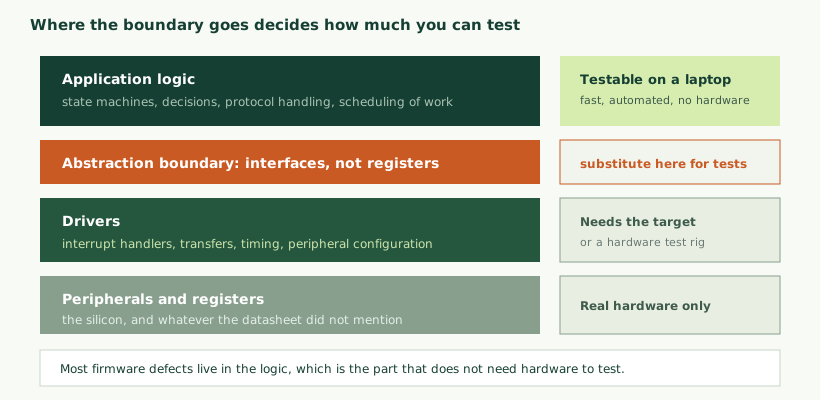
The single structural decision that most affects how testable and how portable firmware is: where the line sits between code that touches hardware and code that does not.
Logic that reads a temperature, decides whether it is out of range, and determines what to do about it does not need to know which register the reading came from. If it depends on that register directly, it can only be tested on the target. If it depends on an interface that returns a temperature, it can be compiled and tested on a laptop, in milliseconds, automatically, with the interface substituted for a test version that returns whatever the test requires.
That is the whole argument. Most firmware defects are in logic rather than in register access, and logic is exactly the part that does not need hardware to exercise.
The cost is a layer of indirection and some discipline about not reaching past it. The benefit is that a change can be verified in seconds rather than by flashing a board and observing. On any firmware that will be maintained for years, this pays for itself repeatedly.
Failing safely
Embedded firmware has to decide what to do when something unexpected happens, and the answer differs from other software. Stopping is frequently not acceptable; a device that halts in the field is a device that needs visiting.
The watchdog, used properly. A watchdog resets the device if it is not periodically told that things are working. The common mistake is resetting it from a timer interrupt, which continues firing regardless of whether the application is doing anything useful. A watchdog reset in this way guarantees only that interrupts are running.
Better is for each significant activity to report that it has completed a cycle, with the watchdog reset only when all of them have. That turns the watchdog from a check on interrupts into a check on the system doing its job.
Record why it reset. Most processors indicate the cause of the last reset: power-on, watchdog, brownout, external, software. Reading that at startup and retaining it is close to free and is frequently the only evidence available when a field unit misbehaves. A device that has been resetting on watchdog for weeks looks identical to a healthy one unless somebody records it.
Handle faults rather than hanging. A hardware fault handler that spins forever is common in default configurations and is the worst available behaviour. Recording what happened and then resetting deliberately is better, because it leaves evidence and recovers.
Degrade rather than stop. Where a sensor fails, continuing with reduced function and reporting the failure is usually preferable to stopping. The system should be explicit about what it can no longer do rather than silently producing wrong output.
Diagnosing what you cannot reproduce
The field will produce faults that no bench test provokes. Designing for that in advance is the difference between a diagnosis and a guess.
- A fault record in non-volatile memory. A small structure recording the last few abnormal events with enough context to be useful, surviving reset and readable later.
- Counters. Resets, watchdog triggers, communication failures, retries, sensor faults. Cheap to maintain and immediately informative when compared across a fleet.
- A log that does not block. Writing to a circular buffer in memory and outputting when convenient, rather than blocking on a serial port, so that logging does not itself change the timing being investigated.
- Adjustable detail. The ability to raise logging verbosity on a specific device without reflashing it.
- Report health with the data. A few bytes of device health alongside the measurements turns fleet diagnosis into a query rather than a recovery exercise, as discussed in cloud backends and dashboards.
Communication code, where the bugs concentrate
Anything that talks to something else, over a serial link, a radio, or a bus, is where a disproportionate share of field problems originate. The reason is that the failure modes are numerous and most of them are rare enough to escape testing.
- Partial messages. A transfer interrupted midway leaves a fragment. Code that assumes a complete message will either hang waiting for the rest or act on incomplete data.
- Unexpected bytes. Noise on a line, a device that restarted mid-transmission, or another device talking at the same time. A parser that assumes well-formed input is a parser that will eventually meet input that is not.
- Timeouts everywhere. Every wait for a response needs a bound. A single unbounded wait is enough to hang a device indefinitely, and it will be the one path nobody tested.
- Buffer boundaries. A length field taken from a received message and used without checking is the classic way a communication routine corrupts memory. Received data should be treated as untrusted even on a supposedly private bus.
- Recovery. After an error, the code must return to a known state and be able to receive the next message. A parser left mid-way through a frame will misinterpret everything that follows.
- Both sides restarting. The other device may reset without warning, and the protocol needs to resynchronise without human intervention.
Because these situations are awkward to produce deliberately, they are the strongest argument for a test rig that can inject them: truncate a message, corrupt a byte, delay a response beyond the timeout, reset the far end mid-transaction. An afternoon spent making those reproducible finds problems that would otherwise appear over years, one confused customer at a time.
Testing
Firmware testing has three tiers and most projects use only the last one.
On a development machine. Logic compiled for the host, with hardware interfaces substituted. Runs in seconds, needs no hardware, can run on every change. This should cover the majority of the code.
On the target, automatically. Drivers and integration exercised on real hardware, ideally on a rig that can be driven from a build system. Slower and needs equipment, but it is where the difference between the datasheet and the silicon appears.
With the environment simulated. A rig that presents the firmware with the conditions it will face, including the rare and dangerous ones: a sensor disconnected, a supply sagging, a message truncated mid-transmission. These are the conditions that cause field failures and the ones that manual testing never covers.
The tests worth writing first are not the ones that confirm normal operation. They are the ones that exercise what happens when something is wrong, because that is the code that is least often executed and therefore least likely to be correct.
Firmware in manufacturing
Firmware has a role in production that is easy to overlook during development and becomes important the moment units are built in quantity.
Getting firmware onto the board. How a factory programs a device affects cost and cycle time. Programming through a debug interface requires a connection and a tool; some parts can be pre-programmed before assembly; some designs use a bootloader that accepts firmware over a connector the product already has. Each has implications for test fixture design and for how a unit is recovered if programming fails.
Production test firmware. Frequently a separate build, or a mode within the normal firmware, that exercises every peripheral and reports a clear verdict. Writing it is real work and it is what makes test fast: a device that can test itself and report a single pass or fail is quicker than an external sequence measuring the same things indirectly, and that difference is a per-unit cost, as discussed in product cost reduction.
Calibration and identity. If the device needs calibrating, firmware performs it and stores the result. If it needs a unique identity, firmware receives and stores it. Both happen during production, both need a defined procedure, and both need a way to verify afterwards that they completed correctly.
Locking down. At the end of production, debug access is typically restricted and protection settings applied. This is irreversible on many parts, so the sequence matters: everything that requires open access must happen first, and a unit locked prematurely is usually scrap.
Traceability. Recording which firmware version was loaded into which unit, alongside calibration values and test results. This is what allows a later question about a specific serial number to be answered, and it costs almost nothing at the time.
Builds that can be reproduced
A product supported for years needs firmware that can still be built years later, and this decays silently unless it is maintained.
The requirements are modest: the toolchain version pinned and archived rather than assumed to remain downloadable, dependencies fixed at known versions, build instructions that work on a clean machine, and ideally an automated build so that the process is exercised continuously rather than living in one person’s environment.
The test is simple and worth performing: can somebody else, on a new machine, check out the source and produce a binary identical to the one that shipped. Where the answer is no, the ability to support the product is already compromised even though nothing appears wrong.
Bringing up a new board
The first time firmware meets new hardware is where most schedule surprises occur, and approaching it methodically shortens it considerably.
The instinct is to load the application and see whether it works. That conflates every possible fault into one observation, and when nothing happens there is no information about why. Working upward in small steps gives a definite answer at each stage.
- Power first, before any code. Confirm each supply rail is present and at the right voltage, and that sequencing is correct. A processor running on a marginal supply produces symptoms that look like software faults for days.
- Then the processor running at all. Something minimal that toggles a pin, proving the clock, the supply and the programming interface.
- Then clocks and timing. Confirm the processor is running at the frequency you believe, because a misconfigured clock produces every timing-related symptom at once.
- Then one peripheral at a time, each exercised in isolation before anything is combined.
- Then the interactions. Peripherals sharing pins, interrupts contending, power domains switching.
- Then the application.
Keeping the small test programs from each stage is worth doing. When a board later misbehaves in production, being able to run the minimal test that exercises one subsystem is far faster than debugging within the full application.
It is also worth expecting hardware faults rather than assuming software. On a first prototype, a proportion of problems are assembly errors, wrong components, or datasheet details that turned out to be inaccurate. Firmware engineers who assume the board is correct lose days; those who measure find the dry joint in an hour. This is part of why bring-up benefits from hardware and firmware people working together, as covered in idea to working prototype.
Taking over somebody else’s firmware
A frequent request, and the sequence matters.
First, build it. Before understanding anything, establish that you can produce the binary currently running. Until that is true, no change can be verified and any modification is a step into the dark. This stage frequently takes longer than expected, because the original environment has not been documented.
Then, understand it. What it does, how it is structured, where the hardware dependencies are, and what the unwritten assumptions are. Reading the code alongside the hardware, and observing the device running, is more reliable than reading either alone.
Then, make it testable. Introducing an abstraction boundary and some tests around the areas you intend to change gives you a safety net before you need it.
Only then, change it. With a way to verify that the change did what was intended and nothing else.
The temptation is always to rewrite. Sometimes that is correct, and more often the existing firmware encodes hard-won knowledge about the hardware that is not written down anywhere else. Rewriting discards it, and rediscovering it is what makes rewrites take longer than estimated.
Code that somebody else has to maintain
Firmware outlives the people who wrote it, frequently by many years. Writing for the person who inherits it is a practical concern rather than a stylistic one.
Explain why, not what. A comment restating what the line does is noise. A comment explaining that a delay exists because a particular sensor needs settling time not mentioned in its datasheet is irreplaceable, because nobody will deduce it and removing the delay will produce an intermittent fault months later.
Name the magic numbers. A constant with a meaningful name and a note about where the value came from turns an unexplainable number into a decision someone can evaluate.
Record hardware quirks where they are handled. Every board has behaviours that are not in any document: a peripheral that needs initialising twice, a pin that must be configured in a particular order, a part that responds slowly after power-up. These are discovered painfully and forgotten easily.
Keep a short architectural description. A page explaining how the firmware is organised, what runs where, and what the main data flows are, saves a successor a week of reading. It does not need to be elaborate; it needs to exist.
Be honest in the known-limitations list. Every product has behaviours that are not quite right and were accepted. Writing them down is more useful than leaving them to be rediscovered as apparent bugs, and it is one of the things our firmware handover checklist asks for.
What a handover should actually contain
Source under version control with a meaningful history. Build instructions verified on a clean machine. The exact toolchain, archived. The flashing procedure, including any fuses or protection settings. A description of the architecture and the hardware dependencies. The test suite and how to run it. The known limitations. And the contact details of somebody who will answer a question in six months.
The absence of any one of these turns a straightforward handover into an archaeology exercise, and the cost of that is usually borne by whoever inherits it rather than by whoever omitted it.
Estimating firmware work, and why it overruns
Firmware estimates are unreliable in a consistent direction, and the reasons are predictable enough to plan around.
Bring-up is not estimated. Getting the first board working is treated as a preliminary rather than a work package, and it regularly consumes more time than the feature it precedes, particularly on new hardware with a part the team has not used before.
The datasheet is incomplete. Every part has behaviour that is not documented, contradicted elsewhere, or only mentioned in an erratum. Discovering and working around these is unavoidable work that appears in no plan.
Integration is where the time goes. Individual features work; making them coexist within the memory, timing and power budget is a separate activity that is rarely scheduled separately.
Error handling is the majority of the code. The path where everything succeeds is a small fraction of what has to be written, and estimates made while thinking about the happy path miss most of the work.
Someone else’s code takes longer than writing it. Understanding an existing implementation, establishing a reproducible build and making a change safely frequently exceeds what writing the equivalent would have cost, which is counter-intuitive and consistently true.
The practical response is to separate these into their own estimates rather than folding them into feature work, and to treat bring-up on unfamiliar hardware as genuinely uncertain rather than assigning it a confident number. A schedule that names these explicitly is more likely to hold than one that assumes they are absorbed.
Mistakes worth avoiding
- Adopting an operating system by default. It imports concurrency problems that may buy nothing.
- Long interrupt handlers. They delay everything else and are hard to reason about.
- Assuming volatile means safe. It does not protect a partially completed update.
- Dynamic allocation during operation. Fragmentation on a device running for years is a matter of time.
- Guessing stack size. Measure it; the cost is trivial.
- Resetting the watchdog from a timer. It then proves only that the timer works.
- Not recording the reset cause. The cheapest diagnostic available, routinely omitted.
- Hardware access scattered through the logic. Makes most of the code untestable.
- Testing only the happy path. Field failures live in the error handling.
- An unreproducible build. Support capability that has quietly expired.
How we help
- Architecture. Loop or scheduler, layering, state machine design, and the boundary that makes the code testable.
- Development. Drivers, application logic, communication stacks and power management, on bare metal or with an operating system.
- Taking over existing firmware. Establishing a reproducible build first, then understanding, then changing.
- Testability. Introducing boundaries and tests to code that has none, and building rigs where hardware-in-the-loop testing is warranted.
- Field diagnostics. Fault records, counters and health reporting that make remote diagnosis possible.
- Handover. Source, reproducible build, documentation and an honest account of limitations.
The service page for this work is embedded firmware development, the update path is covered in device security and OTA updates, and low-power considerations in battery life in connected devices.
Choosing a processor, from the firmware side
Part selection is usually treated as a hardware decision, and firmware has to live with the consequences for the product’s life. A few considerations are worth raising while the choice is still open.
- Headroom in memory and cycles. A part chosen with no margin leaves nothing for the features that will inevitably be requested, or for an update mechanism that needs space for a second image, as covered in device security and OTA updates.
- Quality of the vendor’s software. Varies enormously. Poor driver libraries and sparse documentation can cost more development time than the difference in part price across the whole production run.
- Debug capability. Trace support, breakpoint count, and whether the debug interface can be used while peripherals run. These determine how quickly problems get found.
- Ecosystem maturity. Whether the components you need already support this family, or whether you will be porting them.
- Family compatibility. Being able to move to a larger or smaller member of the same family without rewriting is valuable insurance against both feature growth and cost reduction.
- Longevity commitment. Some manufacturers publish how long a part will remain available, which matters for a product expected to ship for a decade, as discussed in product cost reduction.
Firmware engineers asked late in the process can only report problems. Asked during selection, they can prevent them, and the cost of involving them is an hour.
A short glossary
| Term | Meaning |
|---|---|
| Bare metal | Firmware running without an operating system, typically a main loop plus interrupt handlers. |
| RTOS | A small operating system providing tasks, scheduling by priority, and synchronisation primitives. |
| Interrupt handler | Code that runs in response to a hardware event, interrupting whatever was executing. |
| Critical section | A region during which interrupts are disabled to protect shared data. Should be as short as possible. |
| Volatile | A hint to the compiler not to optimise away accesses. Not a synchronisation mechanism. |
| Watchdog | A timer that resets the device unless periodically told the system is working. |
| Brownout detection | Holding the processor in reset when the supply falls below a safe level. |
| High-water mark | The greatest extent to which a stack has been used, measured by pre-filling it with a known pattern. |
| Memory protection unit | Hardware that traps accesses outside permitted regions, turning silent corruption into a detectable fault. |
| Hardware abstraction | An interface separating logic from register access, which is what makes most firmware testable off-target. |
| Hardware in the loop | Testing firmware on real hardware against a simulated environment, including conditions that are difficult to produce physically. |
If you take one thing away
Firmware is judged by how it behaves in the situations nobody planned: the sensor that fails open, the message that arrives truncated, the supply that sags during a transmission, the counter that wraps after forty-nine days. Almost every field failure is one of these rather than a mistake in the main flow, because the main flow is exercised constantly and the error paths are not.
That suggests where to put the effort. Structure the code so the logic can be tested without hardware, because that is where the defects are. Make the error handling explicit and exercise it deliberately. Record enough about what went wrong that a failure in the field produces evidence rather than a shrug. And keep the build reproducible, because a product you cannot rebuild is a product you cannot fix — which is also why a reproducible build environment belongs in the handover — which, under the security obligations now applying to connected products, is increasingly a commitment rather than a preference. How firmware releases are handled once boards are being built is covered in prototype to volume production. For where firmware sits within the wider system, see what industrial IoT actually is.
Questions we are asked about this
What clients ask before starting
Do we need a real-time operating system?
Often not. A well-structured loop with interrupt handlers is simpler, more predictable and easier to reason about, and it suits a great many devices. An operating system earns its place when there are several genuinely independent activities with different timing requirements, or when a component you need expects one.
Why avoid dynamic memory allocation?
Because a device that runs for years cannot tolerate fragmentation, and an allocation failure at an inconvenient moment is difficult to handle sensibly. Allocating everything at startup, or using fixed pools, makes memory use knowable rather than hoped for.
How do we know the stack is big enough?
By measuring rather than estimating. Filling the stack with a known pattern at startup and later checking how much has been disturbed gives a high-water mark. Where the processor supports memory protection, using it turns a silent overflow into a detectable fault.
Is it wrong to reset the watchdog from a timer interrupt?
It defeats the purpose. A timer interrupt will keep firing while the main application is stuck, so the watchdog never triggers. It should only be reset when the parts of the system that matter have each confirmed they are still running.
Can firmware be tested without hardware?
Most of it, yes, provided the logic is separated from the register access. Application logic behind an abstraction boundary can be compiled and tested on a development machine, which is faster and catches most defects. Drivers and timing still need the target.
Can you take over firmware somebody else wrote?
Yes, and it is a common request. We start by getting it building reproducibly, then by understanding what it does, before changing anything. Establishing a known-good starting point is what makes the subsequent work safe.
What should we receive at handover?
Source, build instructions that work on a clean machine, the exact toolchain and versions, flashing procedure, a description of the architecture, and a candid list of known limitations. Our firmware handover checklist sets out what to ask for.
How do you debug a fault that only happens in the field?
By designing for it in advance. Recording the reset cause, keeping a small fault record in non-volatile memory, and reporting counters lets you diagnose from data rather than trying to reproduce a rare condition on a bench.
What are you building, or inheriting?
Tell us what the device does, what hardware it runs on, and whether this is new development, an extension, or taking over something that already exists.