
Device security and over-the-air updates: designing both in from the start
A device you cannot update safely is one you cannot fix. A device that accepts any firmware is one somebody else can take. Both are decided by choices made before the first board.
In short
- A device you cannot update safely is a device you cannot fix, and every deployed product eventually needs fixing.
- The update channel is also the most direct route into your product. Both problems have to be solved together.
- Memory layout and bootloader design decide this, which is why it cannot be retrofitted without new hardware.
- Design for interruption and reversion. Test by actually cutting power, repeatedly.
- Key management is a process problem as much as a technical one, and key rotation must be designed in before you need it.
Two problems that are really one
Every deployed device will eventually need new firmware. A defect will surface, a vulnerability will be disclosed, a customer will require a capability, or a supplier will change a component in a way that needs accommodating. If updating means sending an engineer to each unit, the true cost of any change becomes prohibitive, and the practical consequence is that problems go unfixed.
So an update path is not a convenience. For a product with a service life measured in years it is a requirement, and one that determines whether the product can be supported at all.
But an update channel is also the most direct route into your product. A mechanism that accepts firmware without verifying who produced it is a mechanism for installing somebody else’s firmware on your entire fleet. The two problems are inseparable, and both are architectural decisions that are painful or impossible to add later.
What a workable update actually requires
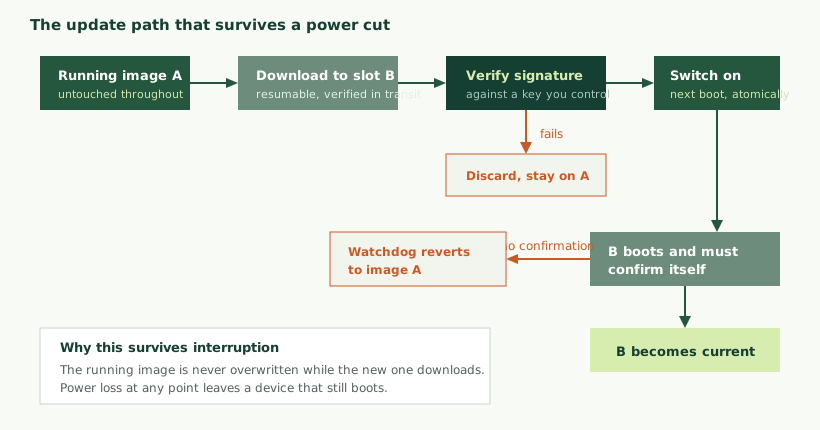
The failure everyone is trying to avoid is a device that will not boot, because that turns a software problem into a site visit. Several properties together prevent it.
- The running image stays intact while the new one arrives. Downloading over the code currently executing is possible in constrained designs but leaves a window during which any interruption is fatal.
- Verification before use. The image is checked for integrity and authenticity before anything switches to it, not after.
- Atomic switchover. The transition from old to new happens in a way that cannot be half-completed, typically by writing a small flag that the bootloader reads.
- Self-confirmation. The new firmware must actively signal that it is running correctly. If it crashes, hangs or fails to reach its confirmation point, the device reverts on its own.
- Resumable download. On a poor connection, a device that must restart a large download from the beginning each time may never complete one.
- Version reporting. Knowing what each device is actually running, which becomes essential the moment a fleet is not uniform, and it never stays uniform.
Memory layouts, and what each costs
| Approach | How it works | Needs | Failure behaviour |
|---|---|---|---|
| Two internal slots | Both images held in internal flash; boot from whichever is marked active | Roughly twice the application size | Safest. Interruption at any point leaves a bootable device |
| Download to external storage | New image staged in external flash, copied in by the bootloader | An external memory part | Safe during download; the copy window needs care and resumability |
| Single slot, direct overwrite | New image written over the old one | Least memory | Interruption leaves an unbootable device. Avoid unless forced |
| Differential update | Only the differences from a known base version are sent | Exact base version match; more complex tooling | Much smaller downloads; more ways to get it wrong |
The first row is the one to design for where memory allows, and the memory it needs is the reason this decision must be made before the part is chosen. Discovering during development that the selected microcontroller cannot hold two images is a hardware change, not a software one.
Differential updates deserve a note. They reduce download size substantially, which matters on metered or slow connections and directly reduces energy on battery devices. The cost is that the device must be running exactly the base version the difference was computed against, so the update server has to track versions precisely and produce a difference per source version. It is a worthwhile optimisation for large fleets on constrained links and unnecessary complexity for small ones on good connections.
Establishing that firmware is yours
Verification rests on a chain. An immutable first stage, typically in read-only memory the device cannot be persuaded to skip, checks the signature of what it is about to run. That stage checks the next, and so on. Each link verifies the next before transferring control, so the trust extends from something that cannot be modified.
The signature itself is produced by signing a hash of the image with a private key you hold. The device holds only the corresponding public key, which can be read without harm but must not be replaceable, so it lives in one-time-programmable memory or an immutable region. If an attacker can substitute the public key, the whole arrangement collapses, which is why where that key lives matters as much as the cryptography.
One further protection is worth including: preventing downgrade. An attacker who cannot forge a signature may still be able to install an older, genuinely signed image that contains a vulnerability you have since fixed. A monotonic counter that refuses images below a recorded version defeats this, and it has to be incremented deliberately, since it cannot be undone.
The bootloader is a product in its own right
Teams frequently treat the bootloader as a small piece of plumbing and are surprised by how much attention it needs. It is the one component that cannot be fixed by an update, because it is what performs updates, and a defect in it can render a fleet unrecoverable.
That gives it different engineering requirements from the application.
- It must be small and simple. Every feature is code that can contain a defect you can never fix in the field. Resist the urge to add diagnostics, protocols and conveniences to it.
- It must handle every failure it can encounter. Corrupt image, truncated image, wrong signature, unreadable storage, exhausted retry counter. Each needs a defined behaviour, and the default behaviour for anything unexpected should be to run the existing image.
- It should be immutable in production, or as close as the hardware allows. Most microcontrollers offer write protection for a region of flash, and the bootloader is exactly what it is for.
- It needs its own test plan. Not a subset of the application tests but a deliberate campaign of corrupting images, interrupting operations and presenting invalid input.
Where a vendor or open-source bootloader with a maintenance history exists for your platform, using it is usually better engineering than writing one. The scenarios it has already encountered across many deployments are scenarios you would otherwise discover yourself, in the field.
Updating the bootloader itself
Occasionally you will need to, and it is the most dangerous operation a device can perform, because a failure part way through leaves nothing capable of recovery.
The approaches that make it survivable involve a small immutable first stage that can update the larger second stage, so the truly irreplaceable part is minimal, or hardware support for a dual-bank arrangement covering the bootloader region. Both need deciding at the start. If neither is available, the honest position is that bootloader updates are not possible in the field, and the bootloader should be correspondingly conservative.
Key management is where this gets difficult
The cryptography is well understood and the libraries are mature. The hard part is organisational.
Where does the signing key live? A private key on a developer’s laptop is a key that will eventually be copied, committed to a repository, or leave with an employee. Hardware security modules exist for exactly this reason, and for products of any significance the signing key should live in one and never exist as a file.
Who can sign? Signing production firmware should require deliberate action by identified people, ideally more than one, with a record of what was signed and when. Build systems that can sign automatically are convenient and mean that compromising the build system compromises the fleet.
What happens when it is compromised? This is the question that separates designs that have thought about it. If your devices trust exactly one key and that key is exposed, anyone holding it can install firmware on every unit you have shipped. Recovery requires devices to accept a new key, which means the capability to rotate keys must exist in the firmware already present in the field.
Designing for rotation usually means devices trusting more than one key, or trusting an intermediate key that can be replaced by a signed update from a root key held even more carefully and used even more rarely. Both add complexity. Neither is as expensive as discovering, after a compromise, that recovery requires physically visiting every device.
Device identity and manufacturing
Firmware signing establishes that the code is yours. Device identity establishes which device you are talking to, and it is the other half of the problem.
The weak arrangement, still common, is a shared credential: every device holds the same key or the same certificate. It works until one device is examined, at which point the credential is known and any attacker can impersonate any unit, or connect a device of their own that your backend will accept.
The better arrangement gives each device a unique credential provisioned during manufacture. Two approaches exist. The credential can be generated externally and injected, which is simpler but means the secret exists outside the device and the factory becomes a place where secrets are handled. Or the device can generate its own key internally, never exposing the private part, and produce a certificate request that is signed by your authority. The second is stronger and needs more tooling.
Either way, manufacturing becomes part of your security design. That is frequently the point at which a team realises their contract manufacturer needs to be involved in a conversation nobody had planned, and it is worth having that conversation before the production run is scheduled.
The rest of the surface
Update integrity and identity are the foundations. Several other decisions matter and are routinely left as defaults.
Transport security. Authenticated, encrypted communication, with certificate validation genuinely enabled. Disabling validation during development and forgetting to re-enable it is one of the most common findings in embedded security reviews, and the system works perfectly either way, which is precisely why it goes unnoticed.
Debug interfaces. An open debug port typically allows firmware to be read out and memory inspected. Most microcontrollers offer protection levels that disable or restrict it. The decision involves a real trade-off, because the same interface is valuable for diagnosing returned units, and the sensible position is usually to lock it while retaining a documented, authenticated route for authorised access.
Data at rest. What the device stores, and what someone holding one would learn from it. Credentials, keys, cached data and logs all deserve consideration. Encryption helps only if the key is protected better than the data, which loops back to where keys live.
What the device says about itself. Verbose diagnostic output over a serial port is a gift to anyone analysing the product, and is another development convenience that should be reconsidered before production.
Supply chain and the software you did not write
Most firmware is substantially composed of code from elsewhere: a real-time operating system, a network stack, cryptographic libraries, driver code from the silicon vendor, and various open-source components. Their defects become your defects, and their vulnerabilities become yours to fix.
This has become a live commercial issue, because customers increasingly ask what is in a product. Several frameworks now expect manufacturers to know their components and to act when one of them is found vulnerable.
Practically, that means maintaining an inventory of what your firmware contains and at what version, so that when a vulnerability is announced in a component you can answer within hours whether your product is affected. Without such an inventory, the answer takes days of code archaeology, and during those days you cannot tell customers anything useful.
It also means having a position on updating dependencies. Pinning versions gives reproducible builds and stability; never updating them accumulates known vulnerabilities. The workable middle is deliberate periodic review rather than either extreme.
Handling a vulnerability report
Somebody will eventually tell you about a weakness in your product. How that goes depends almost entirely on whether you prepared for it.
Have a published route. A named address for security reports, easy to find, monitored by someone. Researchers who cannot find a contact frequently publish instead, and the first you hear of it is a customer asking about an article.
Acknowledge quickly. Even without an answer. Silence is the most common complaint from people who report vulnerabilities, and it turns cooperative disclosure into public disclosure.
Know how long a fix takes. Which means knowing how long it takes to build, sign, test and roll out an update. If that is six months, you have a problem that is not about security at all.
Be able to tell customers what is affected. Which product versions, which firmware versions, and what they should do. This requires the component inventory and the version reporting discussed above.
None of this is expensive to prepare and all of it is expensive to improvise. A product with a working update path, a version inventory and a monitored contact address can handle a disclosure as routine engineering. A product without them handles it as a crisis.
Rolling out to a fleet
Having the capability is not the same as operating it well.
Stage the rollout. Update a small group first, observe, then widen. A defect that reaches ten devices is an inconvenience; the same defect reaching ten thousand simultaneously is an incident. The staging should be automatic rather than dependent on someone remembering.
Watch for devices that do not return. The signal that matters after an update is not how many succeeded but how many stopped reporting. A device that updated and then went quiet is the one you need to know about immediately.
Expect a long tail. Devices that are switched off, out of coverage, or in storage will update weeks or months later, which means your backend must continue supporting older versions for far longer than the rollout plan suggests.
Do not assume a uniform fleet. After the first update, you have at least two versions in the field permanently. Designing the backend to cope with version diversity from the start avoids a class of problem that otherwise appears on day one of the first rollout.
Who triggers the update, and when
Having an update mechanism raises a question that is as much product design as engineering: who decides that a device updates, and at what moment.
Pushed automatically gives you the fastest route to a fixed fleet, which matters greatly for a security fix. The cost is that a device may become unavailable at a moment its owner did not choose. For equipment in a production process, an unexpected restart is not a minor inconvenience.
Offered and accepted puts the timing under the owner’s control, which industrial customers generally prefer and often require. The cost is a long tail of devices that never update, including the ones most likely to need it.
Scheduled windows combine both: updates are automatic but only within a period the owner has agreed. This is usually the right arrangement for equipment in service, and it needs the device to know the time reliably, which is a small requirement that is easy to forget.
Whichever you choose, the device should refuse to update while it is doing something that must not be interrupted. A machine mid-cycle, a measurement in progress, a battery too low to complete the operation. Checking preconditions before starting is straightforward and prevents the category of incident that makes customers disable updates entirely.
The battery-powered case
Devices running on cells introduce a specific hazard: an update that consumes more energy than remains. A large download over a radio can represent a substantial fraction of a small cell, and a device that exhausts itself part way through an update is exactly the unrecoverable outcome the whole design is meant to prevent.
The protections are simple and must be deliberate. Check the reserve before beginning, size the check against the worst-case energy of the whole operation rather than the typical case, and prefer differential updates to reduce what has to be transferred. On devices where the update itself is a meaningful fraction of annual energy, the frequency of updates becomes a design parameter rather than an operational choice, which is part of the wider budget discussed in battery life in connected devices.
What the backend has to do
The device side gets most of the attention, but an update capability is a system, and the server half carries obligations of its own.
- Know what every device is running. Firmware version, hardware revision, and when each last reported. Without this you cannot target an update or confirm one worked.
- Hold artefacts immutably. A signed image, once published, should never change. Overwriting a release with a corrected build while keeping the same version number is a reliable way to create a fleet in two different states that both claim to be the same version.
- Control who receives what. By group, by hardware revision, by region, by proportion. Hardware revisions matter more than expected, because a product that has been through a component change may need different firmware.
- Serve resumable downloads. If the device supports resuming, the server has to as well.
- Record outcomes. Which devices took the update, which confirmed success, which reverted, which stopped reporting. The last category is the one that needs attention.
- Allow a rollout to be halted. When something looks wrong, stopping should take seconds and should not require a deployment.
That last capability is worth building before the first rollout rather than during the first bad one. The situation in which you need it is precisely the situation in which nobody has time to build it.
It is also worth being deliberate about hardware revision tracking. Products change during their life: a component goes out of production, a supplier substitutes a part, a board is revised. Firmware that assumes one variant and is deployed to another produces failures that are difficult to diagnose because the devices appear identical in every record. Recording the hardware revision alongside the firmware version, and being able to target on it, prevents an entire category of confusing incident.
Proportion, and threat modelling
It is possible to spend the whole development budget on security. The useful discipline is being specific about what you are protecting against.
A sensor reporting ambient temperature and a device controlling machinery do not warrant the same measures. The questions worth answering are: what would an attacker gain, what access would they need, what would failure cost, and who plausibly has both the motive and the capability.
That last one matters. Protecting against a determined, well-resourced adversary with physical access is a different and much more expensive proposition than protecting against opportunistic network attacks, and most products need the latter. Being explicit about which you are designing for prevents both under-protection and expensive over-engineering.
What almost every connected product needs regardless: verified updates, unique device identity, authenticated encrypted transport, no default credentials, and a defined way to report and fix a vulnerability. Those are the baseline, and a product lacking them is difficult to defend in any conversation with a security-conscious customer.
A note on development conveniences
A recurring pattern in embedded security findings is that the weakness was not an oversight but a deliberate shortcut, added to make development easier and never removed because the product worked perfectly with it in place.
The usual examples: certificate validation switched off so a self-signed test server could be used. A hard-coded fallback credential so the device could be reached when provisioning failed. A debug command that dumps memory. Verbose logging over a serial port. A build flag that skips signature checking on engineering units, which then ships because the flag was set in the wrong configuration.
What makes these dangerous is that none of them causes a symptom. The product functions identically with or without them, so ordinary testing does not find them and nobody is prompted to remember.
The habit that catches them is keeping an explicit list, from the moment each shortcut is introduced, of what must be changed before production, and reviewing that list as a release gate rather than relying on memory. It is unglamorous and it works. A related habit is making the production build configuration the default and requiring deliberate action to produce a development build, so that the failure mode of forgetting is a build that is harder to debug rather than one that is insecure.
Testing it properly
- Interrupt updates deliberately, many times. Cut power during download, during verification, during the switchover, and during the first boot of the new image. The device should still boot every time.
- Try to install unsigned firmware, and firmware signed with the wrong key. Both should be refused, and the device should remain on its existing image.
- Attempt a downgrade to an older signed image and confirm it is refused where you have implemented protection against it.
- Break the new firmware on purpose and confirm the device reverts without intervention.
- Interrupt the network mid-download repeatedly and confirm the transfer resumes rather than restarting.
- Verify certificate validation by presenting an invalid certificate and confirming the connection is refused.
- Attempt to read firmware over the debug interface on a production-configured unit.
- Exercise key rotation at least once, in the laboratory, before you need it in anger.
The regulatory picture
Security obligations for connected products have been tightening in several markets, and this is now a commercial matter rather than only a technical one.
Frameworks exist covering consumer connectable products, radio equipment, and industrial automation, and they variously address default passwords, vulnerability disclosure, update provision and the duration for which updates must be available. Which apply depends on your product category and the markets you sell into, and both the requirements and their timelines have been moving.
Because of that movement, we will not state specific obligations or dates here. What we would say is that the direction is consistent: products sold into these markets are increasingly expected to support updates for a defined period, to avoid shared default credentials, and to have a published route for reporting vulnerabilities. Designing to that baseline is sensible regardless of which framework ultimately applies to you.
Confirm your actual obligations with a compliance advisor for your product and markets. We are engineers and design with these requirements in view; we do not issue certifications or compliance statements, and where formal assessment is required that is separate accredited work. Our related work is described in EMC and compliance readiness, and the design side in designing electronics to pass first time.
Retrofitting an update path onto a product that has none
This request arrives regularly, usually after a defect has been found in a deployed fleet and somebody has calculated what visiting every unit would cost. The answer depends on what the existing hardware can be persuaded to do, and the options narrow quickly.
| Situation | Options | Realistic outcome |
|---|---|---|
| Spare flash roughly equal to the application | Add a bootloader and a second slot | Full over-the-air updates, achievable |
| External storage present but unused | Stage there, copy in on boot | Workable, with care around the copy window |
| Some spare flash, not enough for two images | Compressed or differential images; move rarely-changed code out of the updatable region | Possible but constrained, and fragile |
| No spare flash, no external storage | None that are safe | Hardware change, or local updates only |
| Existing bootloader with no verification | Add signing, but the unverified path remains in the field | Improves new units; deployed ones stay vulnerable |
Two points are worth being blunt about. First, an update capability added to firmware that is already deployed has to be delivered by some means to devices that currently have no way of receiving it, which usually means a physical operation on every unit. That is the visit you were trying to avoid, and the benefit is only for subsequent updates.
Second, adding verification later does not secure devices already in the field, because the unverified path they contain is the one an attacker would use. It protects units shipped afterwards, which is worth doing, but it should not be described as having fixed the problem.
This asymmetry between designing it in and adding it later is the strongest practical argument for treating the update path as a first-order requirement at the start of a product, alongside the power budget and the enclosure, rather than as a software feature to schedule later.
Two worked situations
A sensor fleet on a low-power network
Constrained memory, small payloads, expensive transmission and battery power. Two internal slots if flash allows, otherwise external storage. Differential updates to reduce transmitted volume, which matters directly as energy. Updates offered rather than pushed, with devices collecting them when convenient rather than being interrupted. Signature verification is non-negotiable; transport encryption may be constrained by the network, in which case signing carries the security weight. Expect updates to take days to propagate across the fleet, and design the backend accordingly.
Equipment installed at customer sites
Mains powered, better connectivity, but installed on networks you do not control and often behind restrictive firewalls. Outbound-only connections so no inbound access is required. Staged rollout with careful observation, because these customers notice. Per-device identity so a unit can be individually revoked. A documented update policy is frequently a procurement requirement, and being able to state how long updates will be provided is increasingly something buyers ask for in writing.
Mistakes worth avoiding
- Leaving the update path until later. It determines memory layout, so later means new hardware.
- A shared credential across the fleet. One examined device compromises all of them.
- Certificate validation disabled from development. Everything works, and nothing is verified.
- No rollback. A bad release then requires physical access to every device.
- No downgrade protection. Old signed firmware with known holes remains installable.
- Signing keys on developer machines. They escape eventually.
- No plan for key compromise. Recovery becomes a field visit to the whole fleet.
- Updating everything at once. Turns a defect into an incident.
- Testing updates only on a good connection. The field is not the laboratory.
How we help
- Threat assessment proportionate to the product, so effort goes where it changes the outcome.
- Architecture. Memory layout, bootloader design, secure boot and the update scheme, decided early enough to be implementable.
- Bootloader and update implementation, including interruption and reversion behaviour, tested by causing the failures.
- Provisioning. Getting unique credentials into devices during manufacture without exposing them in the factory.
- Backend. Update service, version tracking and staged rollout control.
- Key management process your team can actually follow, including rotation.
The service page for this work is device security and OTA updates, and the firmware context is in embedded firmware development.
How long will you support it?
This question is increasingly asked during procurement, and a product team that has not decided the answer tends to give an evasive one, which buyers notice.
Committing to a support period means committing to keep a build environment working, to retain the ability to sign, to have people who understand the code, and to be able to roll out an update, for however many years you state. Each of those decays quietly if nobody maintains it. A build that cannot be reproduced because a toolchain version is no longer available is a common and entirely avoidable way to lose the ability to support a product.
Practical measures that preserve the capability: archive the complete toolchain rather than assuming it will remain downloadable, keep builds reproducible so that the same source produces the same binary years later, document the signing process as an operational procedure rather than tribal knowledge, and test the whole path occasionally by actually building, signing and deploying an update to a test device.
That last suggestion sounds unnecessary and is the one that catches the problems. A support capability that has not been exercised for two years frequently turns out not to work.
And what happens at end of support
Worth deciding deliberately rather than by default. Will devices keep working without updates, which is usually the case for devices whose function is local? Will a cloud service they depend on continue, and for how long? Will you tell owners, and how far in advance?
Products that depend on a service which is later withdrawn generate justified anger, and this has become a reputational issue for several manufacturers. Being explicit at the point of sale about what the product does if the service ends is both fairer and commercially safer than leaving it undefined.
A short glossary
| Term | Meaning |
|---|---|
| Bootloader | The small program that runs first, decides which image to start, and performs updates. Cannot usually be fixed in the field. |
| Secure boot | Each stage verifying the signature of the next before running it, anchored in something immutable. |
| Root of trust | The part of the chain that cannot be modified and therefore does not need to be verified by anything else. |
| Atomic switchover | Changing which image runs in a way that cannot be left half-completed. |
| Rollback | Automatic reversion to the previous image when new firmware fails to confirm it is working. |
| Anti-rollback | Refusing to install older versions, preventing an attacker reinstating firmware with known vulnerabilities. |
| Provisioning | Giving each device its unique identity and credentials, usually during manufacture. |
| Secure element | A separate chip that stores keys and performs cryptographic operations without exposing the keys. |
| Readout protection | A microcontroller setting preventing firmware being read out through the debug interface. |
| Staged rollout | Updating a small proportion of a fleet first, so a defective release reaches few devices. |
| Component inventory | A record of what third-party code a product contains and at what version, so vulnerability questions can be answered quickly. |
If you take one thing away
Both halves of this subject are decided before the first board is manufactured. Memory layout determines whether safe updates are possible. Where the verification key lives determines whether firmware can be trusted. Whether the device can generate its own identity determines what manufacturing has to handle.
None of these can be added later without new hardware, and all of them are inexpensive when considered at the start. The products that get into difficulty are rarely the ones that chose the wrong cryptography. They are the ones that treated updating as something to sort out after the product worked, and then discovered that the answer was a redesign. The wider conformity process is covered in CE, UKCA and FCC certification, and the regulatory obligations now attaching to connected products in security regulation for connected products. Where updating fits within the wider system is covered in what industrial IoT actually is.
Questions we are asked about this
What clients ask before starting
What happens if power fails during an update?
A correctly designed update survives it. That requires either space for a second image or an interruption-tolerant scheme, an atomic switchover, and automatic reversion if the new firmware does not run correctly. We test this by deliberately cutting power at many points during the process rather than assuming it works.
Can we add over-the-air updates to an existing product?
Sometimes. It depends on available memory, the existing bootloader, and whether the hardware can hold a second image or reach external storage. Where it cannot, adding the capability means a hardware change, which is why the decision belongs early rather than late.
How much flash does an update capability need?
The safest arrangement holds two complete application images, so roughly twice the application size plus the bootloader. Alternatives using external storage or compressed differences reduce that requirement at the cost of complexity, and each has different failure behaviour.
Do we need a secure element?
Not always. Many modern microcontrollers provide adequate key storage and cryptographic acceleration. A separate secure element is worth considering where keys are especially valuable, where physical attack is a realistic threat, or where a certification scheme requires it.
What stops someone installing their own firmware?
Signature verification against a key you control, anchored in a boot stage the device cannot be persuaded to skip. Without that, an update mechanism is a convenient way for somebody else to install whatever they like across your fleet.
What happens if our signing key is compromised?
Anyone holding it can sign firmware your devices will accept, so the response involves rotating to a new key and getting devices to trust it, which is only possible if you designed for key rotation beforehand. Planning that in advance is considerably cheaper than improvising it under pressure.
Should we disable the debug port in production?
Generally yes, or lock it behind authentication. An open debug interface usually allows firmware to be read out and memory to be inspected. The counterweight is that it also helps field diagnosis, so the decision should be deliberate rather than accidental.
Are there regulations we need to meet?
Increasingly, and they differ by market and product type. Several frameworks now place security obligations on connected products sold in Europe and the UK, and industrial sectors have their own. Requirements and timelines change, so confirm current obligations for your markets with a compliance advisor rather than relying on any article.
How do you update devices today?
Tell us what the product is, how many are deployed or planned, and whether updating currently requires physical access.