
Industrial edge gateways: what they are for and how to choose one
Six jobs a gateway does, which two genuinely justify having one, how to size buffering properly, and why deciding who patches it matters more than the hardware specification.
In short
- Buffering and local decisions are what justify a gateway. Protocol translation alone can often happen elsewhere.
- Decide who patches it before buying it. A gateway owned by nobody becomes the unpatched device on the plant network.
- Size storage for the worst outage, not the average one, on flash that tolerates continuous writing.
- It must alarm on its own silence. A failed gateway looks exactly like a quiet plant.
- Deployment across sites is the project, not the integration on the first one.
What a gateway is for
An industrial edge gateway sits between plant equipment and everything above it. The term covers a wide range of hardware, from small DIN-rail appliances to industrial PCs, and the useful way to think about it is not what it is but which jobs it does.
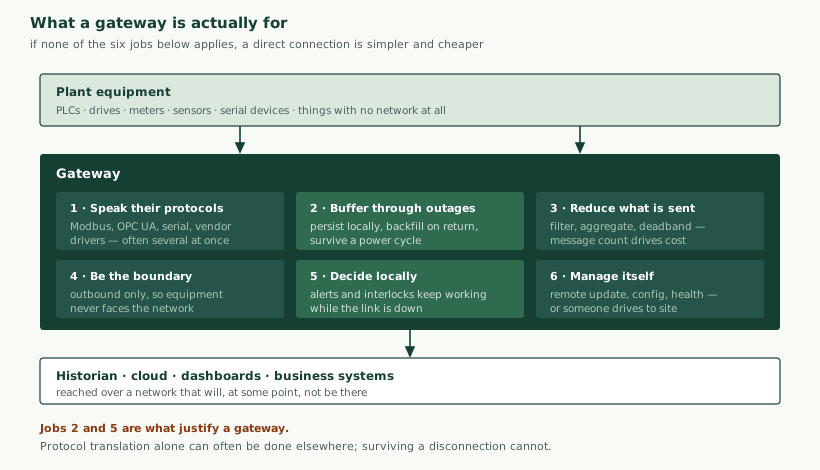
That last point deserves stating plainly, because gateways are frequently specified by default. If your equipment already speaks a protocol your destination understands, the network is dependable, the data volume is modest and nothing needs to keep working during an outage, then a gateway is a box to power, patch and eventually replace, for no benefit.
Of the six jobs, two are the ones that genuinely cannot be done elsewhere. Buffering requires something physically at the site when the network is gone. Local decisions require processing that does not depend on a round trip. Protocol translation can often be done further up, data reduction can sometimes be configured in the source device, and security boundaries can be implemented in network equipment. If the argument for a gateway rests only on those, it is worth checking whether something you already have could do it.
Choosing the hardware
The main decision is less about performance than about who will live with the thing for the next decade.
| Option | Strengths | Costs | Suits |
|---|---|---|---|
| Embedded appliance | Low power, fanless, long availability, little to maintain | Constrained; vendor’s software environment | Many sites, limited IT capacity |
| Industrial PC | Flexible, familiar tooling, real processing | An operating system somebody must patch; fans and drives fail | Fewer sites, heavier processing, in-house capability |
| Single-board computer | Cheap, quick to prototype | Consumer-grade storage and power, uncertain availability | Proving a concept, not a fleet |
| PLC with a communications module | Already there, owned by controls, no new device | Poor buffering, awkward to update, limited processing | Simple translation where a PLC exists |
| Cellular router with logic | Combines connectivity and gateway roles | Varies widely in capability | Remote sites without fixed connectivity |
| Protocol converter appliance | Does one job reliably | Does only that job | Pure translation, no buffering need |
Two criteria matter more than most specification comparisons. Long-term availability: an industrial deployment will want identical units in five years, and consumer-derived hardware will not be available. Environment: temperature range in an unventilated cabinet in summer, vibration, and whether the power supply is as clean as assumed. A gateway specified for an office and installed in a plant room is a recurring failure.
Storage deserves particular attention. Continuous logging writes constantly, and consumer flash wears out under that pattern within a period measured in months rather than years. Industrial-grade storage with adequate endurance, and a design that limits unnecessary writes, is what prevents a fleet of gateways failing at roughly the same time two years after commissioning.
Sizing one, with actual numbers
Gateway specification is frequently done by picking a model that looks adequate. A short calculation gives a better answer and takes minutes.
Start from what has to be read. Suppose a site with four machines, each exposing around 60 values, polled once a second. That is 240 values per second. Add a vibration measurement on two machines producing short high-rate bursts, and a power meter with 30 values at one-second intervals.
| Question | Working | Implication |
|---|---|---|
| Values per second | 240 polled + 30 metering ≈ 270/s | Trivial for any gateway. Polling is rarely the constraint. |
| Stored per day, raw | 270/s × 86,400 × roughly 30 bytes ≈ 700 MB | Uncompressed and unfiltered. This is the number to attack. |
| After deadbanding | Typically 80–95% reduction on process values | Perhaps 50–150 MB/day |
| Buffer for 7 days offline | 7 × 150 MB ≈ 1 GB, plus headroom | Modest. Endurance matters more than capacity. |
| Write endurance | Continuous writing, years | Industrial-grade storage. This is where cheap hardware fails. |
| Vibration bursts | A few seconds at several kHz, per machine, periodically | Process locally — sending raw waveforms is rarely economic |
| Upstream cost | Priced per message on most services | Batching matters more than bandwidth |
Two conclusions follow from this shape, and they generalise. Processing is almost never the constraint for straightforward polling and forwarding; a modest gateway handles thousands of values a second. What actually constrains the choice is storage endurance, environmental rating and long-term availability. And message count drives cost more than data volume, because most upstream services price per event — so batching several readings into one message is frequently a larger saving than any compression.
The exception that changes the calculation is high-rate data. Vibration, audio and current waveforms at kilohertz rates cannot economically be shipped raw, and the gateway’s job becomes extracting features locally and sending those. That shifts the requirement from storage to processing and is the main reason to specify a more capable unit.
What runs on it
The software environment matters as much as the hardware and is chosen with less thought.
| Approach | Strengths | Costs |
|---|---|---|
| Vendor platform on an appliance | Supported, integrated, quick to a working system | Constrained to what it does; migration is difficult |
| Flow-based tools | Very quick to build; readable by non-programmers | Logic that grows organically becomes hard to test or review |
| Containers on a Linux gateway | Familiar tooling, testable, versionable, portable | An operating system to maintain; more to set up |
| Custom application | Exactly what is needed, minimal footprint | Everything is yours to build and maintain |
| Cloud-vendor edge runtime | Integrates neatly with that vendor’s services | Couples the edge to a cloud choice |
Flow-based tools deserve a fair assessment because opinions about them are unusually polarised. They are genuinely excellent for getting a first integration working, and a plant engineer can often maintain one without a software background. The difficulty is that they encourage logic to accumulate without structure, and a flow that has grown for two years is difficult to test, review or hand over. A reasonable position: use them where the logic is genuinely simple routing and transformation, and move to something testable when it starts carrying business rules.
Whatever the approach, two requirements apply. The configuration must be exportable and stored in version control, so a failed gateway can be rebuilt without recreating work from memory. And whatever transformation happens at the edge must be documented, because data that has been scaled, filtered or aggregated no longer matches the source and somebody will eventually compare them.
Networking
The network arrangements are where deployments stall, and they are mostly not technical difficulties but organisational ones.
- Outbound-only connections avoid needing inbound firewall rules, which avoids a conversation that can take weeks. This is the single most useful architectural choice for getting a deployment approved.
- Addressing on the plant side. Industrial networks frequently use fixed addressing with no spare range, and adding a device requires somebody who knows the scheme. Ask early.
- Duplicate addressing across sites is common — many sites use the same private range internally — which matters if anything needs to reach in. Another argument for outbound-only.
- Cellular needs coverage checked at the actual installation point, inside the actual cabinet. A metal enclosure in a plant room is a poor radio environment, and an external antenna is often the difference.
- Remote access for support has to be designed rather than improvised. A permanent inbound path is a liability; a support session that can be opened deliberately and closed afterwards is the better pattern.
- Time synchronisation. The gateway is usually where timestamps are applied, so its clock matters. It needs a time source, and one that works when the network does not, or buffered data carries wrong times.
That last point is easy to overlook and produces a specific unpleasant failure: a gateway that loses time across a power cycle, then timestamps buffered data from an incorrect clock, writes a stretch of history that is confidently wrong. A real-time clock with a battery, and a check that time is plausible before trusting it, prevents it.
Commissioning, and what to verify
A gateway that works on the bench frequently does not work on the plant, and the differences are predictable enough to test for deliberately.
- Read every point and check the values against the machine. Not that data arrives, but that the numbers are right — scaling and byte-order errors produce plausible wrong values rather than obvious ones.
- Verify units and scaling against the source, documented, before anyone builds a report on them.
- Pull the network cable. Confirm buffering starts, then reconnect and confirm backfill completes, in order, without duplicates.
- Pull the power. Confirm the gateway restarts unattended, resumes polling, and that buffered data survived.
- Check the clock after a power cycle with no network, which is the case that produces wrong timestamps.
- Leave it running for a week before declaring success. Memory leaks, flash issues and scheduled disturbances appear over days, not hours.
- Verify the health alarm by stopping the gateway and confirming somebody is actually notified.
- Test the remote update path before you need it, on a site you can reach physically.
Steps 3, 4 and 7 are the ones most often skipped, and they test exactly the functions a gateway was bought for. A buffering implementation that has never been tested by an actual disconnection should be assumed not to work.
A worked example
A company operating twelve unmanned water treatment sites, each with a PLC controlling the process, wants central visibility and alerting. Sites have cellular coverage of variable quality and no fixed network. Currently an operator visits each site weekly and reads values from an HMI.
What the requirement implies:
- A gateway is clearly justified. Buffering is essential — cellular at these sites will drop — and local alerting must continue when the link is down, because a process problem during an outage is exactly when notification matters.
- Cellular router with gateway capability, or a gateway plus modem. One device is usually preferable at unmanned sites: fewer things to power, fewer to fail.
- Read from the PLC, read-only. No write path; the process keeps running as it does today, and nothing about the control system changes.
- Buffer for at least a week, on industrial storage, since a site visit to reset something is a half-day.
- Local alerting with its own path. If the alert depends on the central system, it cannot fire during the outage. An SMS from the gateway itself is crude and works.
- Health reporting with an alarm on silence, distinguishing between a site that is quiet and a site that has stopped reporting.
- Zero-touch provisioning and templated configuration, because twelve sites configured by hand will diverge and site visits are expensive.
- Spares configured and on a shelf. At an unmanned remote site, swapping a unit beats diagnosing one.
- External antenna assumed until coverage is measured at each cabinet.
The notable point is that almost none of this is about processing capability. The specification is driven by unattended operation, intermittent connectivity and the cost of a site visit — which is generally true of distributed deployments and is why gateway selection is a deployment question rather than a technical one.
What it costs
| Item | Nature | Notes |
|---|---|---|
| Gateway hardware | One-off per site | Range is wide; rarely the dominant cost |
| Installation and cabinet work | One-off per site | Often exceeds the hardware; access and permits dominate |
| Integration on the first site | One-off | Where the engineering effort concentrates |
| Subsequent sites | Small, if templated | Large, if hand-configured. This is the whole argument for templating. |
| Connectivity | Recurring per site | Cellular data, usually modest at these volumes |
| Upstream message charges | Recurring | Priced per event; batching is the lever |
| Software licensing | Varies | Per-gateway or per-tag models scale unpleasantly. Price at full scope. |
| Maintenance and patching | Recurring | The cost that decides which hardware was right |
The row that changes programme economics is the fourth. If adding a site is a templated, zero-touch operation, a rollout scales; if it needs an engineer to configure each unit, cost grows linearly with sites and the programme usually stops partway. That difference is established by decisions made on the first installation, which is the argument for building the second site’s process while doing the first.
Buffering, done properly
Buffering is the primary reason to have a gateway, and it is implemented badly often enough to be worth being specific about.
- Persist to storage, not memory. A memory buffer loses everything on the power cycle that frequently accompanies a network problem.
- Size for the worst outage. Not the average. A week is a reasonable target for a remote site; a day may suffice where someone is present.
- Decide what happens when the buffer fills. Discard the oldest, discard the newest, or stop accepting. All three are defensible and the choice must be deliberate, because the default is whatever the software happens to do.
- Backfill without overwhelming the destination. A week of buffered data released at once can exceed what the receiving system will accept, so the rate needs limiting.
- Preserve the source timestamp. Backfilled data arrives late and out of order; if it carries only arrival time, the history is wrong in a way that is hard to detect later.
- Make it idempotent. Resent records must be recognisable as duplicates, or a backfill inflates counts.
The last two are where most implementations fall down, and they are the same issues discussed in OT/IT integration: late, out-of-order and duplicated data are the normal consequence of buffering working correctly, and consumers must be built to expect them.
What to run locally
A gateway has real processing available, which raises the question of what should happen there rather than upstream.
| Work | Gateway | Why |
|---|---|---|
| Protocol translation | Yes | Has to happen where the equipment is |
| Unit conversion and scaling | Yes | Makes everything downstream simpler |
| Filtering and deadbanding | Yes | Reduces cost, which is usually per message |
| Aggregation over short windows | Yes | Cheaper than sending raw and aggregating later |
| Threshold alerts that must survive an outage | Yes | The whole point of local logic |
| Anomaly detection on high-rate data | Often | Sending raw vibration to the cloud is rarely economic |
| Cross-site comparison | No | Needs data from elsewhere |
| Model training | No | Needs history and compute; train centrally, run locally |
| Long-term storage | No | A buffer is not a historian |
| Safety functions | Never | A separate, certified discipline. Not this. |
The last row is not a technical judgement but a categorical one. Safety functions belong in systems designed and certified for the purpose, and a general-purpose gateway running application software must never be positioned as providing them — a point made in the same terms in process and environmental monitoring about gas detection.
The anomaly-detection row is where gateways are genuinely well placed. A microcontroller at the sensor has too little processing for anything substantial; the cloud is too far away and too expensive for high-rate data. A gateway sees several machines, has processing to spare, and can act without a round trip. The trade-offs of running models at different points are covered in edge AI on microcontrollers.
Polling, and the details that spoil a dataset
Reading from industrial equipment is conceptually simple and has a set of specific traps, each of which produces data that looks fine and is wrong. Which protocol you are using is covered in the protocol comparison; what follows applies whichever it is.
- Byte and word order. A 32-bit value spread across two registers can be assembled four ways, and three of them give plausible nonsense. Verify against a known value on the machine rather than assuming the documented convention.
- Signed and unsigned. A temperature reading 65,000 is almost certainly minus half a degree interpreted as unsigned.
- Scaling. Controllers commonly hold integers with an implied factor. The factor lives in the PLC program, not in the register, and it changes when somebody edits the program.
- Poll rate against update rate. Polling faster than the controller updates produces repeated values that look like a stable process. Polling slower aliases, which produces confident nonsense — the same problem described in sensor selection.
- Grouping reads. Reading contiguous registers in one request is far more efficient than individually. On a serial link the difference decides whether a poll cycle completes at all.
- Don’t overload the controller. A PLC running a process has other work. Aggressive polling can affect scan time, which is a genuine way to make a monitoring project unwelcome.
- Distinguish a stale value from a fresh one. If a read fails and the last value is forwarded, downstream sees a flat line rather than a gap, and a flat line reads as a healthy stable process.
The last is the one that causes the most lasting damage, because it is silent. A gateway that repeats its last known value during a failure produces a record indistinguishable from a machine running steadily. Forwarding an explicit quality indicator, or a gap, is always preferable to a plausible fabrication.
Register maps and where the meaning lives
The map that says which register holds what is frequently the most valuable document in the whole integration and frequently does not exist. It lives in the controls engineer’s knowledge, in a spreadsheet of uncertain vintage, or implicitly in the PLC program.
Two practices are worth insisting on. Capture the map as a versioned artefact with units, scaling, valid ranges and what each value means, at commissioning while somebody still remembers. And establish a change process with whoever maintains the PLC program, because a register reassigned during a maintenance shutdown will silently change what your data means, and the gateway will keep reporting confidently. This is the same class of problem as the naming and definitions discussed in OT/IT integration, at a lower level.
Redundancy, and whether you need it
A gateway is a single point of failure for everything behind it, which raises the question of duplication. The honest answer for most installations is that it is not warranted, and the question is worth asking properly rather than answered by instinct in either direction.
| Situation | Consequence of a gateway failure | Reasonable response |
|---|---|---|
| Monitoring and reporting only | A gap in the record | Alarm on silence, configured spare on a shelf |
| Feeds production reporting | A gap somebody must explain | As above, plus a documented manual fallback |
| Local alerting depends on it | Alerts stop; nobody knows | Independent alarm path; consider redundancy |
| Feeds a billing or regulatory record | A gap with consequences | Redundancy, and reconciliation against another source |
| Anything controlling the process | Not applicable | A gateway should not be controlling the process |
Redundancy is also harder than it looks once buffering is involved: two gateways both buffering and both backfilling produce duplicates, which is manageable only if records carry stable identities and the destination deduplicates. Adding a second unit without solving that creates a data-quality problem in place of an availability one.
For most installations, the proportionate answer is the first row: reliable detection of failure, a configured spare, and a documented swap procedure. Recovery in an hour is usually worth more than an architecture that never fails, and it is achievable.
Gateways against devices that connect directly
An alternative architecture skips the gateway: each device connects directly to the destination, with a cellular or long-range radio of its own. This is increasingly common with battery sensors and is a genuinely different trade-off rather than a worse one.
| Gateway | Direct-connected devices | |
|---|---|---|
| Connectivity cost | One link per site | One per device; grows with the estate |
| Device complexity | Lower; devices can be simple | Higher; each needs its own stack and credentials |
| Buffering | Central, generous | Per device, constrained by power and memory |
| Security | One boundary to harden | Each device exposed; each needs updating |
| Failure | One failure affects the site | Failures are independent |
| Local logic | Straightforward | Difficult across devices |
| Suits | Sites with several devices and existing equipment | Scattered sensors, no site infrastructure, few devices |
The practical rule: where devices are concentrated — a plant, a building, a skid — a gateway is usually cheaper and easier to secure. Where they are scattered across a wide area with no common site, direct connection avoids infrastructure that would exist only to serve one or two devices, which is the pattern described in asset tracking and remote monitoring. Many real estates end up with both, and that is a reasonable outcome rather than an inconsistency.
A short glossary
| Term | Meaning |
|---|---|
| Store and forward | Holding data locally when the link is down and sending it when it returns. The defining gateway capability. |
| Backfill | Delivery of buffered data after a reconnection. Arrives late and out of order by nature. |
| Deadband | Only reporting a value when it changes by more than a threshold. The main lever on data volume. |
| Idempotent | Safe to receive twice. Necessary once anything is resent. |
| Zero-touch provisioning | A device configuring itself on first connection, so no skilled visit is needed per site. |
| Register map | The document saying which register holds what, with units and scaling. Frequently the most valuable artefact and frequently missing. |
| Quality indicator | A flag saying whether a value is fresh, stale or failed. Prevents a failure reading as a stable process. |
| Scan time | How long a PLC takes per program cycle. Aggressive polling can affect it, which makes a project unwelcome. |
| Write endurance | How much writing storage tolerates before failing. What separates industrial from consumer flash. |
Security, and the device in the middle
A gateway is a computer with a route to the plant network and a route outward, which makes it both the natural place for a security boundary and an attractive target.
Done well, it improves the position considerably: equipment never faces the outside network, connections are outbound only so no inbound path is opened, and one device is hardened rather than many. Done badly, it is a bridge between the two domains with a default password.
- Outbound connections only, so nothing needs opening inbound at the firewall.
- Read-only to controllers unless a write path is genuinely required, and then specific and logged.
- Its own credentials, not shared. A common password across a fleet of gateways means one compromise is all of them.
- Update path that works remotely, exercised before it is needed.
- Unused services disabled, including the ones enabled during commissioning.
- Named owner for patching. The question that decides whether any of the above is maintained.
The ownership question is the one most often left open. A gateway running a general-purpose operating system needs the same patching discipline as a server, and in the gap between IT saying it is plant equipment and OT saying it is a computer, it goes unpatched for years. Settling this before purchase — and choosing an appliance with a narrower surface if nobody will own a general-purpose system — is a more consequential decision than the hardware specification. The wider obligations now attaching to this are in security regulation for connected products.
Power, and the cabinet it lives in
Gateway failures in service are more often environmental than functional, and the causes are unglamorous enough to be designed out.
- Supply quality. A gateway fed from the same 24 V supply as contactors and solenoids sees the transients they produce. A dedicated supply, or at least adequate filtering, prevents a class of inexplicable resets.
- Hold-up through brief dips. A supply interruption of a few hundred milliseconds will restart a gateway that has no reserve. Where dips are common, hold-up capacitance or a small uninterruptible supply removes repeated restarts and the storage corruption they can cause.
- Cabinet temperature. The specification that matters is the temperature inside the enclosure on the hottest day with the door shut and everything else in there running — commonly far above ambient. Fanless units with a wide range are worth their premium.
- Mounting and vibration. DIN rail in a cabinet on a machine sees more vibration than expected. Connectors that rely on friction work loose.
- Graceful shutdown. Storage written at the moment power is removed can corrupt. Filesystems that tolerate abrupt loss, or a supply that signals an impending shutdown, prevent a failure mode that appears months in and looks like a software fault.
The last two combine into the characteristic remote-site failure: a gateway that has power-cycled hundreds of times over a year, corrupts its storage, and stops reporting. It reads as a software problem and is a power problem, and it is why the power arrangement deserves attention before the software does.
The first one is a pilot whether you call it that or not
Whatever the intention, a gateway is frequently the first piece of a data programme a plant actually sees, and it will be judged accordingly. That has a practical implication: choose the first site for what it will teach rather than for convenience. A site that is easy to reach and has cooperative equipment proves very little, and problems that would have surfaced there appear at site seven instead, when the approach is already committed.
A better first site has at least one awkward characteristic — an older controller, marginal connectivity, a cabinet with no space — because solving that once informs every subsequent installation. The second site is then where the templating and provisioning are proven, and by the third the process should be repeatable by someone who was not involved in the first two.
Deploying across sites
The first gateway is an integration exercise. The fiftieth is a different problem, and it is the one that determines whether the programme succeeds.
- Configuration from a template, not by hand. Fifty hand-configured gateways diverge, and nobody can say how.
- Configuration in version control, so what a gateway is running is knowable and restorable.
- Zero-touch provisioning where possible: a gateway that configures itself on first connection removes the need for a skilled person at every site.
- Remote update for both the platform and your own logic, with a rollback for when an update is wrong.
- Health reporting from every unit, and an alarm on silence.
- A documented recovery procedure that someone unfamiliar can follow, because eventually one will have to.
- Spares held, configured, ready to swap. Replacement is usually faster than diagnosis at a remote site.
Health reporting deserves emphasis. A gateway that stops sending looks identical to a site where nothing is happening, and without an explicit alarm on absence, a failure is found when somebody asks why a report is empty — often weeks later. The same point applies to everything remote, and it is the most common single defect in distributed installations.
What usually goes wrong
- A gateway where none was needed. Specified by habit, then maintained forever.
- Consumer hardware in an industrial environment. Temperature, vibration and flash wear all arrive within two years.
- Memory-only buffering. Fails at exactly the moment it was bought for.
- Buffer sized for the average outage. The worst one is the one that matters.
- Nobody owns patching. The gateway becomes the oldest unpatched device on the network.
- Hand configuration. Works for three sites, unmanageable at thirty.
- No alarm on silence. Failures found weeks later, by accident.
- Local logic nobody documented. Transformations applied at the edge that nobody upstream knows about, producing numbers that cannot be reconciled.
The last is subtle and causes lasting confusion. A gateway quietly scaling, filtering or aggregating produces data that does not match the source, and when somebody eventually compares the two, the discrepancy is blamed on the instrument. Whatever the edge does to data belongs in documentation that travels with the data.
Questions worth asking a gateway supplier
Including us. The answers distinguish products designed for fleets from products designed for demonstrations.
- How long will this exact hardware be available? A five-year deployment wants identical spares in year four. Consumer-derived hardware will not be there.
- What is the storage, and what is its write endurance? If the answer is vague, assume consumer flash and expect failures around two years in.
- Show me buffering working. Ask for a demonstration of a disconnection, a power cycle during the outage, and a backfill that arrives in order without duplicates. This is the core capability and it is frequently weaker than claimed.
- How is configuration exported and restored? If the answer involves recreating it by hand, a failed gateway is a day of work rather than a swap.
- How are updates delivered, and what happens if one fails halfway? Remote update without a rollback is a way to disable a remote site.
- Who provides security updates for the operating system, and for how long? Particularly for anything Linux-based.
- How does it report its own health, and what raises an alarm? Silence must be detectable.
- What does licensing cost at full scope? Per-tag or per-gateway pricing that is trivial for a pilot can dominate a rollout. Ask for the number at the size you intend, not the size you are starting with.
A supplier comfortable with the third question is usually worth working with. Buffering under interruption is the capability most often asserted and least often demonstrated, and asking to see it tends to be clarifying.
If you take one thing away
A gateway is not a technical purchase; it is an operational commitment. The hardware specification matters far less than three questions: who patches it, how you find out it has stopped, and whether adding the fiftieth site costs the same as the second.
Installations that answer those well succeed with modest hardware. Installations that answer them badly fail with expensive hardware, usually around eighteen months in, when the first units start dropping out and nobody notices until a report comes back empty.
How we help with this
We work on gateway selection and specification, the protocol and integration work, buffering and local logic, security boundary design, and the deployment and management arrangements that make a multi-site rollout sustainable.
We would want to see the equipment and the network before recommending hardware, because the right gateway depends on what has to be spoken to, what the environment is and who will maintain it — none of which can be established from a specification sheet. We would also say plainly if a gateway is not needed, which is more often than the market suggests.
Related reading: OT/IT integration for what sits above, SCADA and PLC integration for what sits below, protocol comparison for the translation itself, choosing IoT connectivity for the link out, and retrofitting legacy machines where equipment has nothing to speak to. Services: industrial IoT integration. For the wider picture, what industrial IoT actually is.
Questions we are asked about this
What clients ask before starting
Do we need a gateway at all?
Only if one of its jobs applies. If your equipment already speaks a protocol your destination understands, the network is reliable, the data volume is modest and nothing needs to keep working during an outage, a direct connection is simpler and cheaper. Gateways earn their place through buffering, local decision-making, protocol translation and acting as a security boundary — and if none of those is needed, adding one is a box to maintain for no benefit.
Industrial PC, PLC or embedded gateway?
It depends on who will maintain it and what it must do. An embedded appliance is the least trouble to operate and the most constrained. An industrial PC is flexible and brings an operating system somebody must patch. Using a PLC you already have avoids new hardware but is usually poor at buffering and awkward to update. The decision is more about long-term ownership than technical capability.
How much local storage does a gateway need?
Work backwards from how long an outage you want to survive and how much data you generate. A site producing a few hundred values a second, with an expectation of surviving a week offline, needs a surprisingly modest amount — but it needs it on storage that tolerates continuous writing, which rules out some cheap flash. Sizing for the average outage rather than the worst one is the usual error.
Can we run machine learning on a gateway?
Often yes, and a gateway is frequently a better place for it than either a microcontroller or the cloud: it has real processing available, sees data from multiple machines at once, and can act without a network round trip. The limits are that it must be maintainable and that models need updating, which is a fleet-management problem rather than a technical one.
What happens when the gateway itself fails?
Data stops, and how you find out determines how long it stops for. Every gateway should report its own health and raise an alarm on silence, because a failed gateway looks exactly like a quiet plant. For installations where a gap in the record is genuinely unacceptable, redundancy is possible but complicates the buffering considerably, and it is worth being certain the requirement is real before paying for it.
Who should own the gateway, IT or OT?
Whoever will actually patch it, and that question is worth settling before purchase. A gateway is a computer on the boundary between two domains, and gateways owned by nobody in particular become the unpatched device on the plant network. If it runs a general-purpose operating system, it needs an operating-system owner.
Is a cellular router with a data plan enough?
For getting data out, sometimes. What a router does not give you is protocol translation, buffering of application data, local logic or device management, so if the equipment speaks Modbus and the destination expects MQTT, something still has to sit between them. Many products combine both roles, which is usually the sensible arrangement where connectivity is cellular anyway.
What do you actually provide?
Gateway selection and specification, the integration and protocol work, buffering and local logic, the data path into whatever you already run, security boundary design, and deployment and management across multiple sites. We would want to see the equipment and the network before recommending hardware, because gateway choice depends on what has to be spoken to and who will maintain it rather than on any specification comparison.
What is between your equipment and your data today?
Tell us what the equipment speaks, how reliable the network is and how many sites are involved. That is usually enough to say whether a gateway is warranted and what kind.